Welcome / Lab Overview:
In this lab, you will get some hands-on learning with sensors - devices that computers use to gather environmental information from the world around them. You will then build on this knowledge of microcontrollers and sensors to create a basic robot. You will create a robot from your temperature sensor by adding an actuator (i.e. a motor - in this case simulating a fan), by integrating all the components of a robot: a sensor, a controller, and an actuator. With this fundamental knowledge you will be able to understand the myriad combinations of these components, from consumer aerial drones, to surgical robots, to self-driving cars.- Assemble electronics components using a soldering iron
- Build electronic circuits on a breadboard using components such as resistors, LED's, and temperature sensors
- Program the Bluefruit board to accomplish the following tasks:
- Control the Bluefruit's outputs (LEDs, speaker) based on user/sensor input
- Display text/images/simple graphics on the TFT Gizmo (display)
- Control a servo based on user/sensor input
- Improve understanding of Python by making the effects of Python programs more tangible
- Foster excitement in computer science, electrical engineering, and embedded systems
- Give every AI105 student the tools to build a microcontroller-based device
- Have fun!
Scenario
The Temperature Sensor converts the physical ambient temperature into electrical signals as shown in this diagram. (Think back to what we learned about Analog to Digital conversion!)
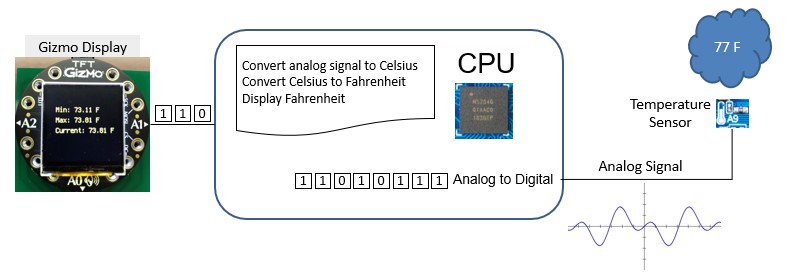
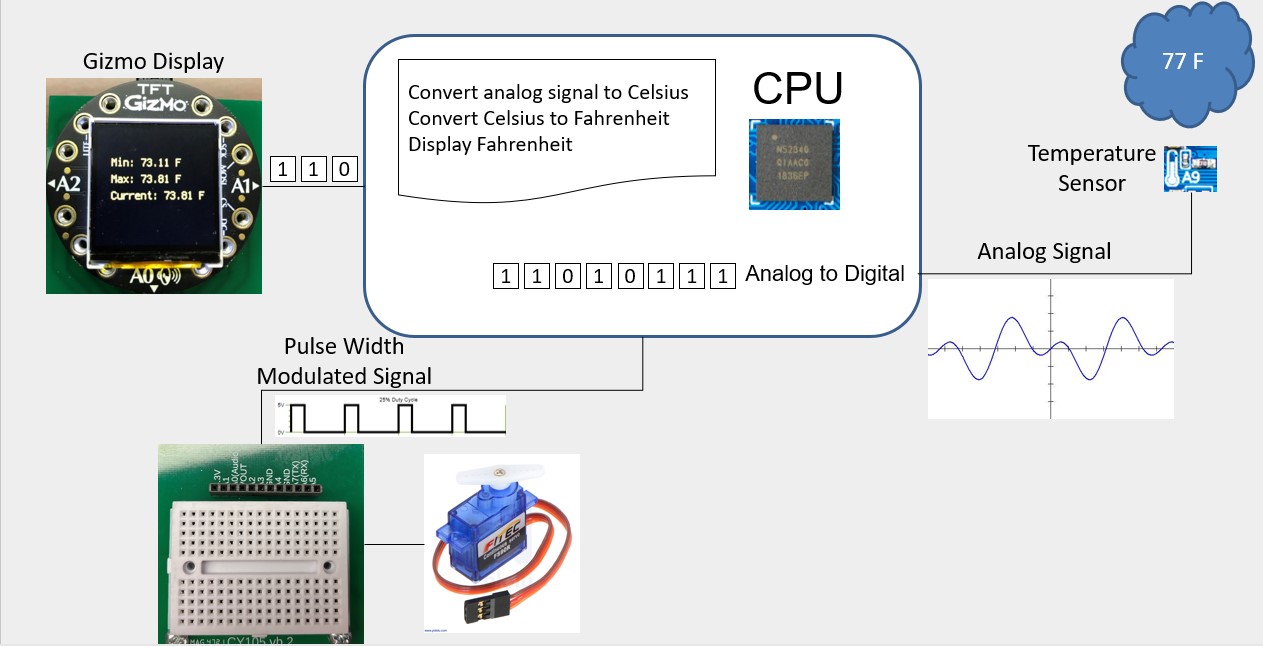
Next, our goal is to build a simple robot that will cool itself based on ambient temperature. It does this by sensing the ambient temperature, converting it to degrees Fahrenheit, calculating the fan's rotations per minute (RPM) appropriate for the temperature, and adjusting the fan speed as appropriate. The schematic below shows adding a servo (the “fan”) to the device:
AI Assistance
Throughout this lab, you will have an opportunity to team with AI and get help on various aspects of your code. Refer to Canvas for details instructions on authorized uses of AI throughout the Robotics Lab. Pay special attention to the instructions on how to create a custom CircuitPython Agent to help you with the lab on days 2-3. For lab activities 1-7 (in-class lab activities), you can essentially consider the Robotics Lab as a group project with your CircuitPython tutor and Soldering assistant. This means, as long as you use the grounding prompts provided and only use that chat/agent to complete an activity in or out of class, then you do not need to cite that. In contrast, Activity 8 (GenAI Activity) requires full and careful documentation.
If you get assistance from a person (classmate, roommate, teammate, team leader, etc.) or external AI on any activity outside of class, you need to cite that as you normally would and submit with the Activity 8 documentation.At the conclusion of that lab, you will be asked to provide a transcript of your chat for the Robotics lab. If you choose to create a custom agent for Activity 8, please be sure to include the system prompt you used, any screenshots of any other configurations. This is practice for the AI Final Project, so please take this seriously!