Internet Protocol v4 (IPv4)
Monday, March 9, 2026
Lesson Objectives
- Understand IPv4 datagram structure and header fields.
- Describe IPv4 addressing: classes, subnetting, and CIDR notation.
- Explain how DHCP assigns IP addresses dynamically.
- Calculate subnet masks, number of hosts, network/broadcast addresses.
Preparation
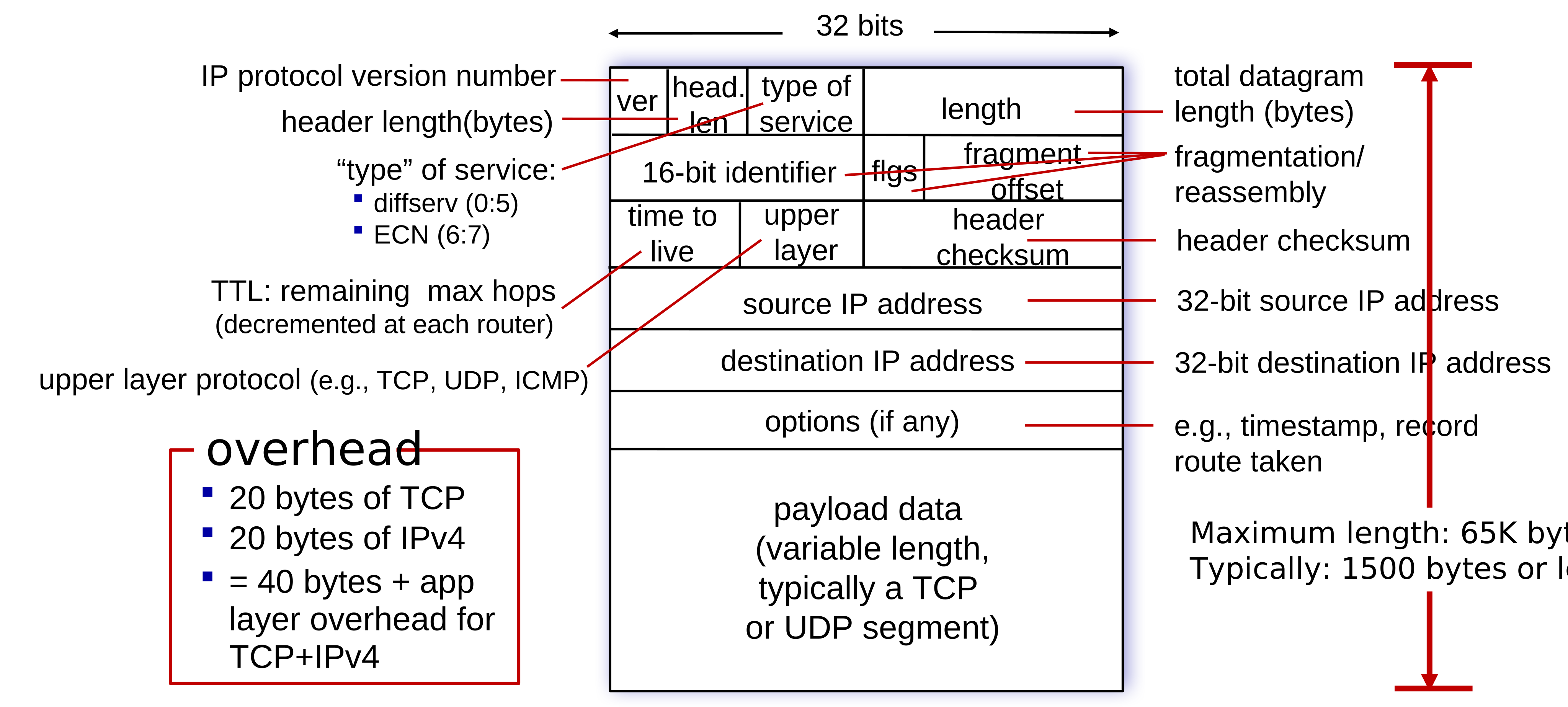
- \(4.3.1\) IPv4 Datagram Format
- \(4.3.2\) IPv4 Addressing
IPv4 Datagram
Addressing
What is an IP Address?
- A 32-bit number that uniquely identifies each host interface on a network.
- Written in dotted-decimal notation, e.g. \(192.168.100.200\)
- Logical address - it can change!
- Assigned by network administrators or dynamically via DHCP.
- Can you assign it yourself?
Network Interface
- 🔌 Connection point between a host and a physical link.
- 🛣️ What about a router?
- 🖥️ Is a router also a host?
- 🔁 Can a host have multiple interfaces?
- 💻📶 How many actual physical interfaces does your laptop have?
Reading IPv4 Addresses
- Each octet represents 1 byte (8 bits) of the address
- Range: \(0 \rightarrow (2^8 - 1) = 255\)
\[ \def\eightblanks{{\_\space\_\space\_\space\_\space\_\space\_\space\_\space\_}} \def\fourtimeseightblanks{\eightblanks\cdot\eightblanks\cdot\eightblanks\cdot\eightblanks} \]
\[199.239.136.245\]
\[\fourtimeseightblanks\]
\[192.168.100.1\]
\[\fourtimeseightblanks\]
Who is in charge of assigning IP addresses? IANA

Reserved Address Spaces
- Cannot be used on the public Internet
- Used for internal communication within private networks
Private Networks
Class A:
10.0.0.0/8Class B:
172.16.0.0/12Class C:
192.168.0.0/16Used with NAT to reach the Internet
Special-Purpose Addresses
- Loopback:
127.0.0.0/8 - Link-local:
169.254.0.0/16 - Multicast:
224.0.0.0/4 - Reserved:
240.0.0.0/4
Where to find an IP Address?
- 🔌 I just plugged in my laptop to the network.
- 🤔 How do I get an IP address?
- 🙋 Do I have to ask the network administrator for one?
- 🎲 Can I just assign myself one?
- 🚶 What if I move to a different network?
- 📋 Can someone just keep track of all the IP addresses and tell me which one to use?
Dynamic Host Configuration Protocol (DHCP)
Messages: DORA
DISCOVER: Who is in charge here of assigning IP addresses?OFFER: I am the DHCP server. Would you likex.x.x.x?REQUEST: Yes, I will takex.x.x.xACK: Great, I will write that down. You have the lease for 86400 seconds.
Leases
- Time to live (TTL) for each assigned IP address
- Matches physical address (MAC address) to the logical address (IP address)
- Can be released or renewed; you can request the same one again
Subnetting
Broadcast Domain
- 💻 A group of devices that can communicate directly without a router
- 📣 Yelling: all devices receive broadcast messages sent by others
- ⚡ Direct communication is efficient
- ❓ Who broadcasts? ARP, DHCP etc.
- 🚧 Routers separate broadcast domains, so they do not forward broadcast traffic
- 🔊 Very noisy if the broadcast domain is too large
- ⚠️ Also very dangerous if not properly secured
Subnet
- 🌐 Smaller portion of a larger network
- ✂️ Used to break up large IP spaces into smaller ones - reduce wastage
- 👥 Defined by people in charge of the network
\[200.23.20.0/24 \rightarrow 24 \text{ network bits} + 8 \text{ host bits} = \underset{\text{NETWORK ADDRESS}}{\underline{11001000 \cdot 00010111 \cdot 00010100}} \cdot \underset{\text{HOST}}{\underline{00000000}}\]
Network Address
- Reserved part of the address
- Same for all devices in the subnet
- Limits broadcast domain size
Host Portion / Part / Number / Identifier
- Remaining bits after the network prefix
- Unique to each device within the subnet
- Used to identify individual hosts
How many bits?
Classless Inter-Domain Routing (CIDR) Notation
\[\text{Network ID} = \underset{\text{NETWORK ADDRESS}}{\underline{10.22.128.0}} / \underset{\text{CIDR}}{\underline{22}} \rightarrow 22 \text{ network bits} + 10 \text{ host bits}\]
Subnet Masks
- 32-bit number with a bunch of
1s followed by a bunch of0s; matches CIDR notation - Tells you how many bits are in the network vs host portions
\[\text{Network ID} = \underset{\text{NETWORK ADDRESS}}{\underline{00001010 \cdot 00010110 \cdot 100000}} \space \underset{\text{HOST}}{\underline{00 \cdot 00000000}}\] \[\text{Subnet Mask} = \underset{\text{22 NETWORK BITS}}{\underline{11111111 \cdot 11111111 \cdot 111111}} \space \underset{\text{10 HOST BITS}}{\underline{00 \cdot 00000000}}\]
\[= 255.255.252.0\]
How many hosts?
\[\text{Total Possible Addresses} = 2^{\text{Number of Host Bits}}\]
First Address: Network ID
- Reserved for the subnet itself
- All host bits are
0
Last Address: Broadcast
- Send messages to all hosts in the subnet
- All host bits are
1
\[\text{Usable Host Addresses} = \text{Total Possible Addresses} - 2\]
Subnetting
🛑 Network Address is assigned by the larger network (e.g. ISP); cannot modify it!
\[\text{Network ID} = \underset{\text{NETWORK ADDRESS}}{\underline{10.22.128.0}} / \underset{\text{CIDR}}{\underline{22}} \rightarrow 10 \text{ host bits}\]
\[\underset{\text{NETWORK ADDRESS}}{\underline{00001010 \cdot 00010110 \cdot 100000}} \space \underset{\text{HOST}}{\underline{00 \cdot 00000000}}\]
💡 Can borrow bits from the host portion to create smaller networks (subnets).
\[\underset{\text{NETWORK ADDRESS}}{\underline{00001010 \cdot 00010110 \cdot 100000}} \space \underset{\text{SUBNET}}{\underline{00 \cdot 0}} \space \underset{\text{HOST}}{\underline{0000000}}\]
If I borrow 3 bits from the host portion
- Subnets: \(2^3 = 8\)
- Hosts per subnet: \(2^{10 - 3} - 2 = 126\)
Subnet Calculations
200.23.20.0/24 = \(\underline{11001000 . 00010111 . 00010100} . 00000000\)
# Host Bits:
# Total:
# Usable:
Broadcast Address:
First Host Address:
Last Host Address:
200.23.20.0/23 = \(\underline{11001000 . 00010111 . 0001010}0 . 00000000\)
# Host Bits:
# Total:
# Usable:
Broadcast Address:
First Host Address:
Last Host Address:
200.23.20.0/25 = \(\underline{11001000 . 00010111 . 00010100 . 0}0000000\)
# Host Bits:
# Total:
# Usable:
Broadcast Address:
First Host Address:
Last Host Address:
Practice
Assigned network address space: 192.168.0.0/23
Assign an appropriate address to each subnet.
Practice
Assigned network address space: 172.18.0.0/23
Assign an appropriate address to each subnet.
