Introduction to Computer Networks
Understanding the Digital Battlefield
Tuesday, January 6, 2026
Instructor Introduction
Introduce Yourself!
- Your Name + Name you like to be called
- Company
- Hometown
- Major + Branch preference
- What do you hope to get out of this course?
- What have you heard about the course?
- Anything else you would like to share?
- Interesting fact about you
- Something you are passionate about
- Any activities you are involved in
Course Overview
- Understand and apply the five-layer network model.
- Compare and contrast network protocols and architectures.
- Develop network applications using the socket application programming interface.
- Understand fundamental network vulnerabilities and associated mitigation techniques.
Lesson Objectives
- Explain why networking is critical terrain in modern warfare and civilian life.
- Identify real-world cyber disruptions to critical services and their broader societal effects.
- Describe the organization of the Internet (end hosts, ISPs, IXPs, CDNs, governments).
- Understand the unique challenges of cyberspace operations across the physical, logical, and persona layers.
- Verify VSCode setup and access to EECSNet and VMs.
Why Care?
- Cyber Domain: Software at all levels of computing devices is where the big opportunities are for exploitation and defense.
- The Army: Communication is critical. All military branches use data networks to communicate.
- Elsewhere: Amazon, Google, Apple, Meta, NSA, the list goes on…
Syllabus at a Glance
- Canvas = source of truth (schedule, readings, rubrics, submissions)
- In-Class Labs, 5-20 points each \(= 100\) points total
- \(10\) Problem Sets, \(30\) points each \(= 300\) points total
- \(2\) WPRs, \(100\) points each \(= 200\) points total
- closed‑book; one handwritten double‑sided page of notes permitted
- Programming Project, \(3\) milestones, \(= 400\) points total
- Python 3 & sockets; incremental feedback
Policies
- Late policy: −10% per 24h; hard stop after 120 hours
- Extension requests: at least 48h in advance
- Start early, ask questions, and get help!
- Academic Use Agreement
- with great power comes great responsibility
- no unauthorized use of tools on production networks
- acknowledge / sign in Problem Set 1
Additional Instruction
- Send me a calendar invitation
- Find me before/after class
- Email me directly
- Drive by! (TH106)
Resources
- Textbook: Computer Networking by Kurose & Ross, 8th Edition
- Check Canvas modules for additional readings
- Read before class; come prepared to discuss!
Assistance or Collaboration?
- Getting a verbal explanation of a specific point of confusion
- Working jointly on a problem set to produce a solution
- Working on parts of homework separately and then combining them
- Using AI tools to help debug code or explain concepts
- Using AI tools to generate code
- Copying from a source considered common knowledge
- Copying from another student
- Looking at another student’s code
Measure of Software Similarity (MOSS)
- This course uses MOSS to compare student solutions
- detects similarities in code
- looks for similarities in structure and logic
Classroom Standards
- Exhibit peer leadership
- Attendance -> Inspection -> Call Attention
- No food or backpacks
- If you see ⭐, call class to attention!
Introduction to Networking
TCP/IP Model
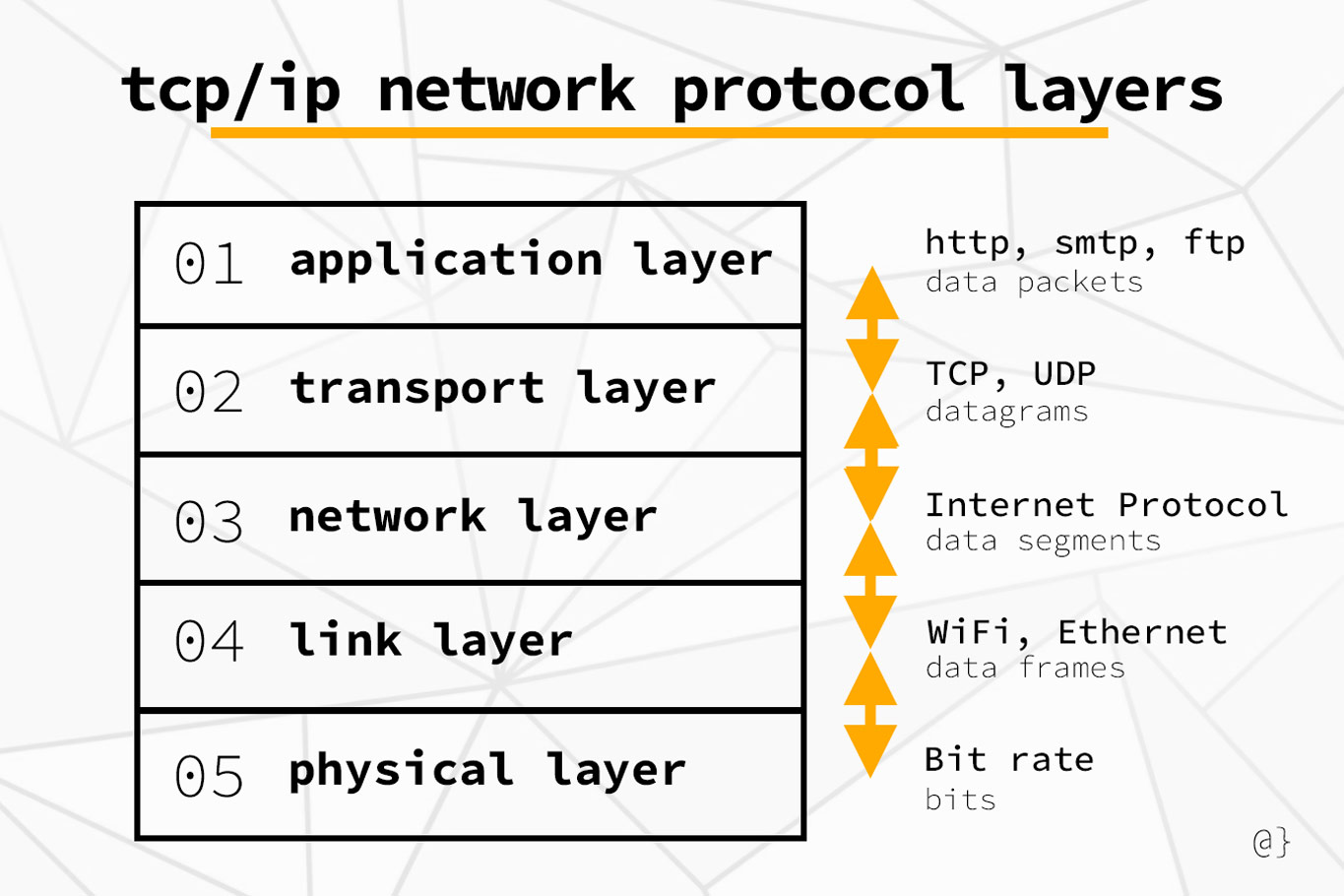
Network Layers
What is EECSNet?
- External network provided by EECS Department
- Supports networking labs and virtual machines for classes and research
- Outside of normal USMA network security protections and restrictions
- Must be accessed via VPN or direct connection (WiFi or Ethernet)
- Carries a little more risk to participating machines
Quick Linux Network Commands
Quick Windows Network Commands
In-Class Exercise
When you just logged into the VM, where do you think those packets actually went?
Wireshark Primer
What is Wireshark?
- GUI packet analyzer for sniffing packets to/from your system
- Parses protocol stacks; shows headers and payloads
- Save/share captures as PCAP files
- Powerful display filters to focus on the traffic you care about
Check out the web version: Wireview
Now: Download any PCAP file from Wireshark Sample Captures
Interface Tour
Packet List (top): one row per packet
Packet Details (middle): protocol tree (L2→L7)
Packet Bytes (bottom): hex + ASCII view
Filter bar: type display filters (e.g.,
http,dns,tcp.port==443)Common Menu Options
- File → Open/Save PCAPs
- Edit → Preferences
- View → Time Display Format
- Go → Next/Previous Packet
- Analyze → Follow TCP Stream
Filters & Tips
- Change Time Display Format to absolute if helpful
- Stop capture before saving; annotate packets when answering questions
- Ensure that you are capturing on the correct host / computer!
- For non-GUI headless captures, use
tcpdumportshark
Common Pitfalls
- Capturing on the wrong interface (VPN vs non‑VPN)
- Not using capture filters to limit data
- Forgetting to clear old capture or display filters
- Looking at unrelated IPs/ports
Problem Set Standards
- Prove your answer!
- Wireshark portions: If the question is what version of HTTP is run, show it in a Wireshark capture (pdf) by highlighting answer and labelling highlight as to which question is being answered.
- Computational portion: On a separate piece of paper, answer each question and upload to appropriate question on Canvas problem set.
- This will help with partial credit.
- Answer all the questions!
Review
Question 1
What best describes the Internet?
- A single global router that forwards all packets
- A network of networks using standardized protocols
- A social media platform for sharing content
- A private military communications backbone
Question 2
Which Wireshark pane displays the protocol tree for a selected packet?
- Packet List pane
- Packet Details pane
- Packet Bytes pane
- Capture Options pane
Question 3
Problem sets are submitted via Canvas and are typically due at…
- 2359 on the posted date
- 1700 the day before the posted date
- 0730 on the posted date
- Rolling deadline; no specific time
Question 4
Which of the following is a display filter example in Wireshark?
tcpdump -i eth0 port 80udp and (dns or quic)host 10.6.7.8 and port 53net 10.0.0.0/8
Question 5
On a headless Linux VM, which tool is best to capture packets for later analysis in Wireshark?
topcurltcpdumpping
Question 6
Which statement about EECSNet is TRUE?
- It’s the same as the USMA production network and requires no VPN
- It’s an instructional/research network accessed via VPN/Wi‑Fi with fewer enterprise restrictions
- It provides free public internet to the entire Hudson Valley
- It only supports Windows clients
What’s Next?
- Readings before next class
- Chapter 1
- Assigned
- PS0 - Usage Agreement & Basic Programming (due Sunday)
- Upcoming
- PS1 - Python Primer
Parting Advice
- Start early, ask questions, and get help!
- Read before class; come prepared to discuss!
- Be proactive about academic integrity and use of AI tools!
- Embrace challenges and stay curious!
